 termdeck
People search for "codex in Claude Code" for one of two reasons. Some want Codex to check Claude's work. Most want GPT models without giving up the Claude Code CLI: the ❯ prompt, the ● tool calls and the status line they already know.
This post covers both, compares the three ways to do it, and shows real Codex chats running in Termdeck.
The short answer
You cannot point the Claude Code binary at OpenAI and get Codex. Claude Code talks to Anthropic's API, and its prompts and tools are tuned for Claude. So "Claude Code with Codex" means one of these:
- OpenAI's Codex plugin for Claude Code. Claude stays in charge and hands reviews or tasks to Codex.
- A model router. A local proxy such as claude-code-router sits in front of Claude Code and forwards its requests to another provider.
- A Claude Code style front end for the real Codex CLI. This is what Termdeck's Terminals page does. Codex runs as itself, with your ChatGPT login, in a pane that reads like Claude Code.
Three ways to use Codex in Claude Code, compared
| Codex plugin for Claude Code | claude-code-router | Termdeck Terminals | |
|---|---|---|---|
| Who runs the chat | Claude, with Codex as a helper | Claude Code, with another model behind it | The real Codex CLI |
| GPT model in charge of the chat | No | Yes | Yes |
| Billing | Claude plan, plus Codex limits for the handoffs | Provider API key, per token | Your ChatGPT plan, through codex login |
| Codex tools and sandbox | Yes, inside the handoff | No, Claude Code's tools | Yes |
| Claude Code look | Yes | Yes | Yes, pane for pane |
| Claude and Codex side by side | In one chat | One model at a time | Any engine in any pane |
The Codex plugin for Claude Code
OpenAI publishes a Codex plugin for Claude Code. You install it with /plugin marketplace add openai/codex-plugin-cc, then get commands such as /codex:review, /codex:adversarial-review and /codex:rescue. It is a good fit for a second opinion: Claude writes, Codex reviews. Claude is still the model you talk to, so it is not the answer if you want GPT driving the session.
claude-code-router
claude-code-router runs a local gateway and points Claude Code at it, so another provider answers in Claude's place. You pay per token with an API key, and the model works inside Claude Code's tools and prompts, which were written for Claude. Results vary by model, so test it on your own repo before you rely on it.
Termdeck Terminals
Termdeck does not reroute Claude Code. It drives each official CLI unchanged on your machine and renders every chat in one layout. On the Terminals page, that layout copies the Claude Code CLI: your prompt after ❯, replies and tool calls with a ● bullet, results hanging under ⎿, and a status line with the model, effort and context. A Codex chat uses the same layout, so Codex feels like Claude Code with a GPT model.
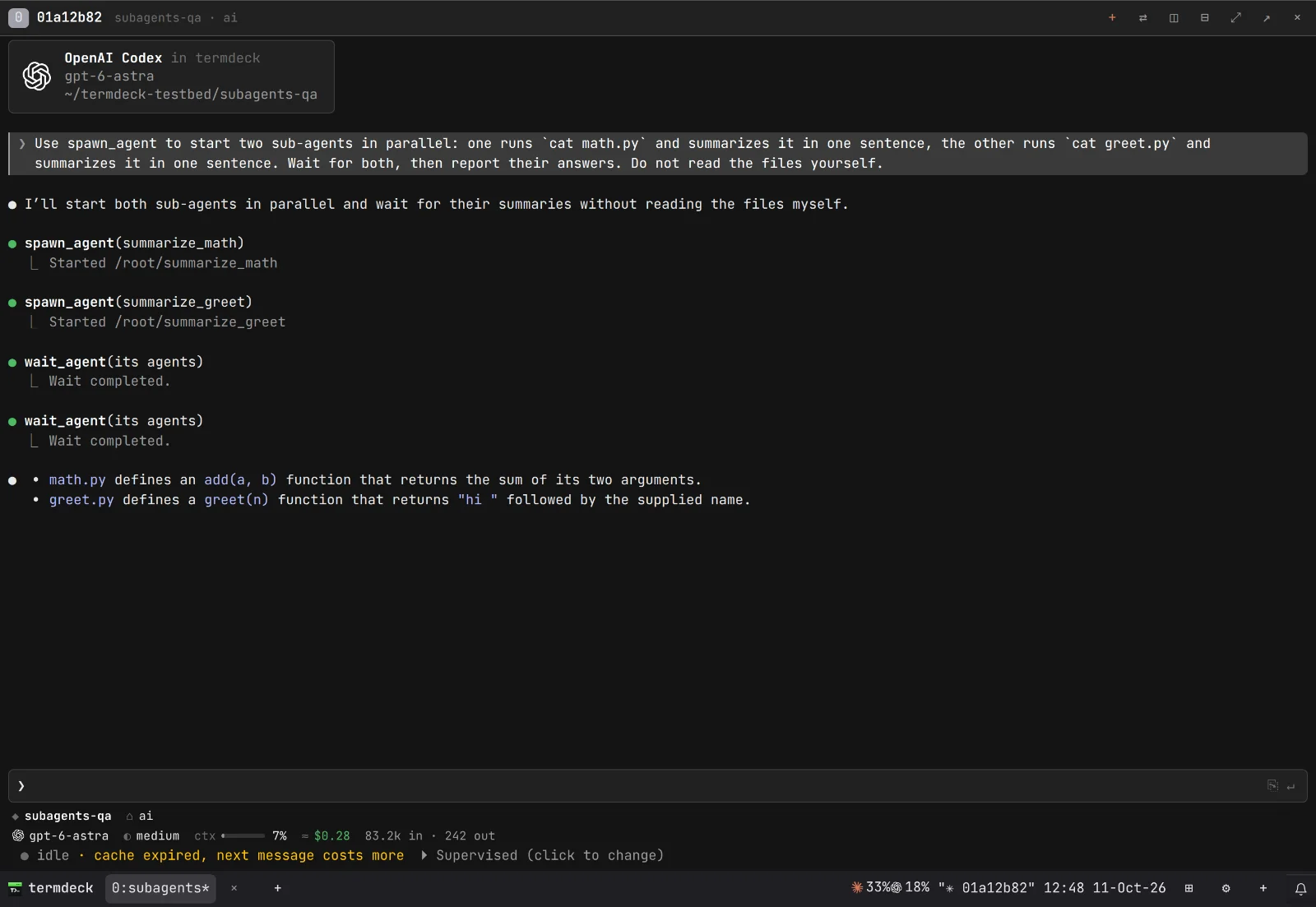
How to use Codex in a Claude Code style terminal
- Connect a machine. Install the Termdeck agent on the computer that holds your code. It dials out to Termdeck, so there is no port to open. See install.
- Install and sign in to Codex. On the machine, run
npm install -g @openai/codex, thencodex login. Or press Install on the Codex row in Settings, then Machines & accounts. Details in engines. - Open Terminals. It is in the top rail of the sidebar.
- Start a pane. Click + on the status bar. The pane opens on a card listing machine, folder, agent, model and effort.
- Pick Codex and a model. Click the agent row and choose Codex. Click the model row for the GPT models your Codex account offers, then set the effort.
- Type and press Enter. The pane becomes a Codex chat and appears in the sidebar.
- Match the look. Click ⚙ on the status bar and pick the Claude dark theme if you want the panes to look like Claude Code's own colours.
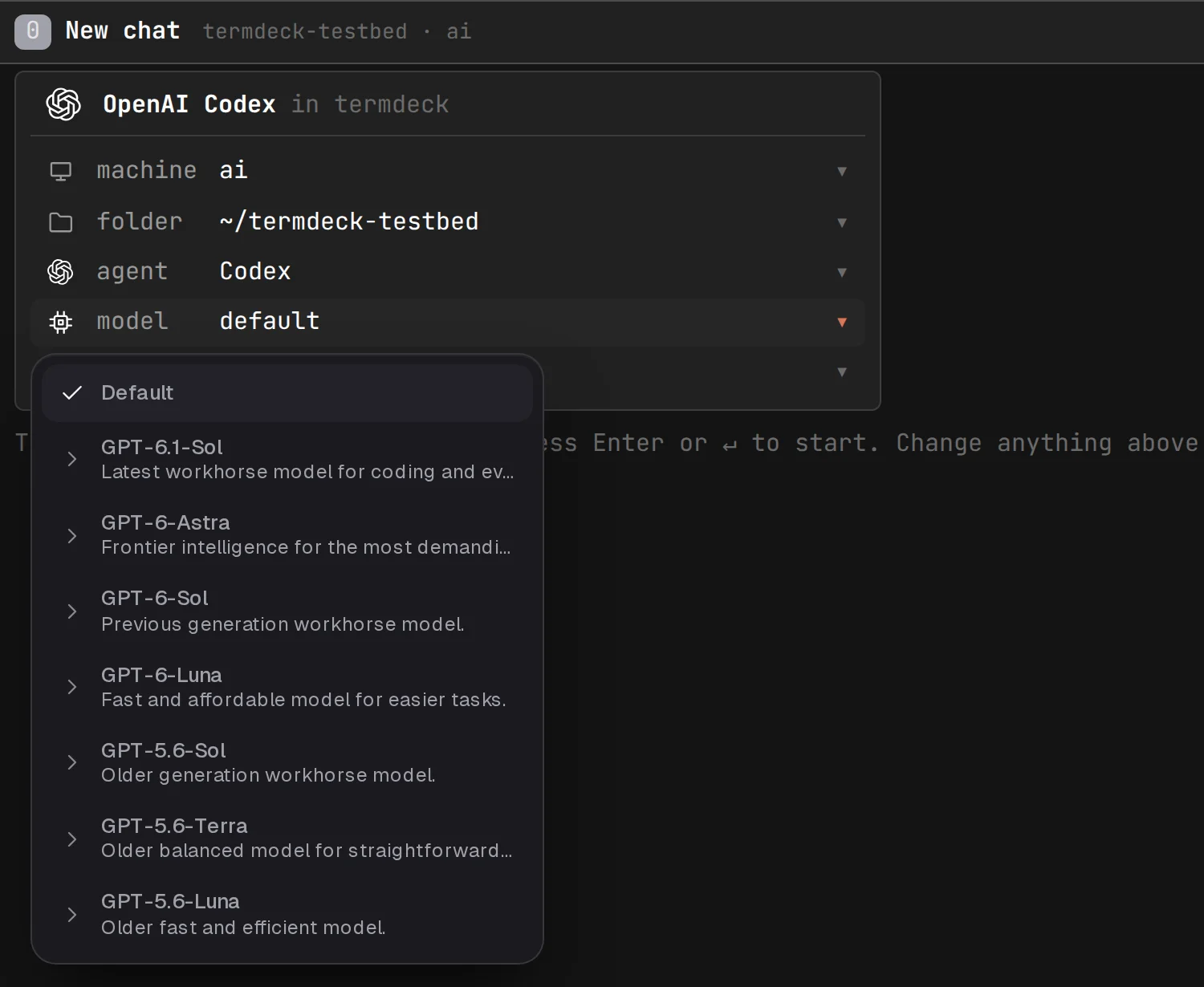
You get the same models codex offers in your own terminal, no more and no fewer. For what each model and effort level is for, see Codex CLI models and effort.
Claude Code and Codex side by side
This is where the Terminals page earns its keep. Split a pane and put Claude Code in one half and Codex in the other. Both use the same prompt, the same tool call bullets and the same status line, so your eyes never have to switch modes.
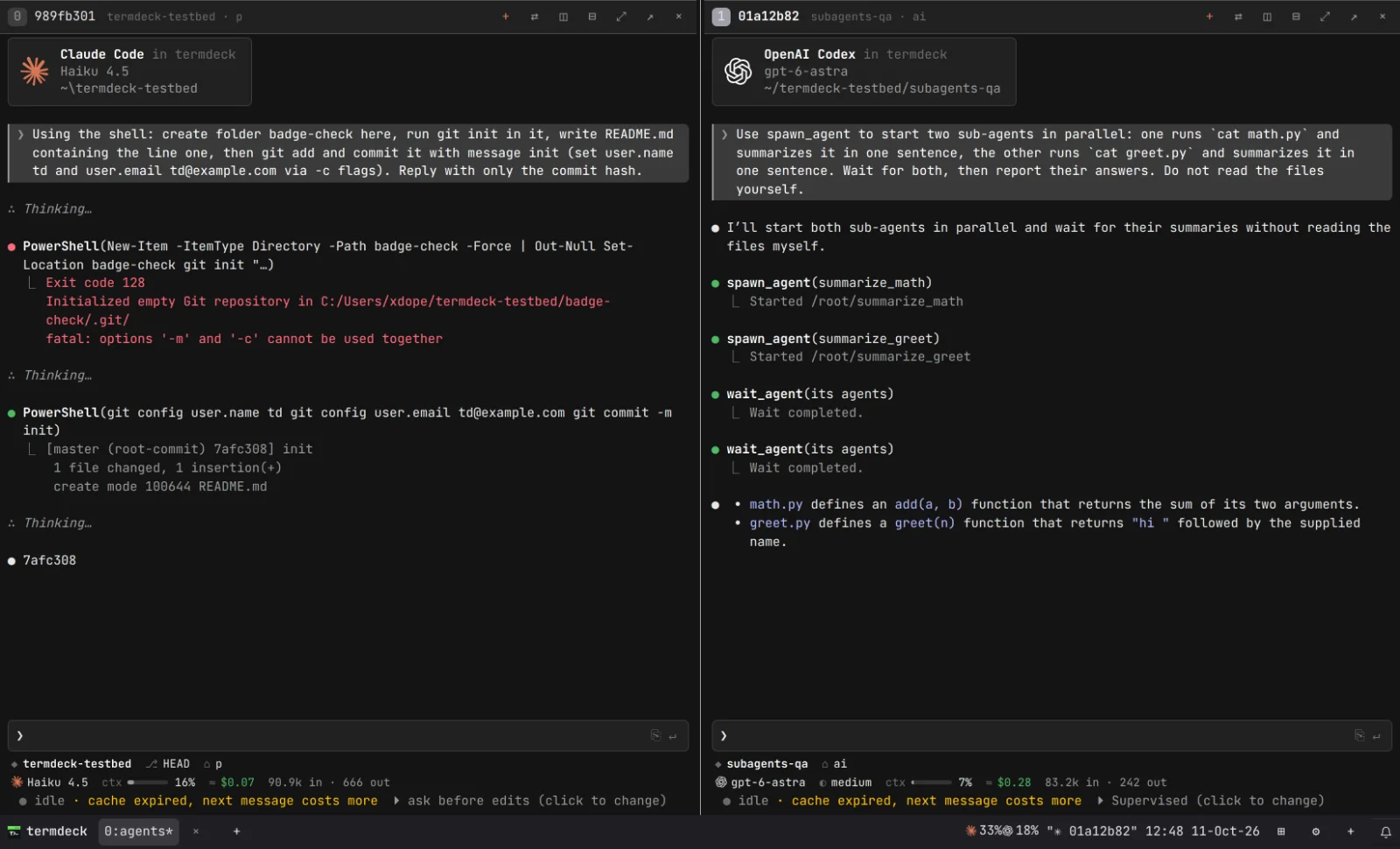
Each pane is a real session on a real machine, and the machines do not have to match. In the screenshot above, the Claude chat runs on a Windows PC and the Codex chat runs on a Linux box. A window holds up to four panes on Starter and nine on Pro. More in Terminal mode for coding agents.
A common way to work: give the same bug to Claude and to Codex in two panes, then keep the better fix. Or let Codex do the long refactor while Claude writes the tests. Each engine bills against its own plan, so a busy Claude limit does not stop the Codex pane.
What works the same, and what differs
Most controls behave identically across the two engines:
- Approvals. When Codex asks to run a command or edit a file, the choices appear in the pane as numbered buttons, the same as Claude's permission prompts. See Codex CLI approval modes.
- Steering. A message sent while Codex is working goes into the running turn. Codex picks it up and keeps going.
- Stopping. Press Ctrl C in the pane, or click ■.
- Resetting. Type
/clearto archive the chat and start a fresh one with the same machine, folder, agent and model. - Resuming in your terminal. Codex keeps writing its own session files, so
codex resumeon the machine picks up a chat you started in a pane. See resume a Codex CLI session.
The differences come from Codex itself. Codex has no slash commands of its own; picking a skill from the slash list writes it into the prompt as text, and /compact on its own compacts the chat. Codex runs commands inside its sandbox, and sub agents show as spawn_agent and wait_agent calls. Termdeck shows what Codex does rather than pretending it is Claude. The full list is in where the engines differ.
Mistakes to avoid
- Expecting GPT inside the Claude binary. Termdeck runs Codex as Codex. If you need Claude Code's exact tool set with another model, that is a router's job, with its trade offs.
- Signing Codex in with the wrong account. Turns bill against whatever
codex loginsaved on that machine. Check the Codex row in Settings, then Machines & accounts. - Two writers on one chat. If
codexin your own terminal is writing to the same session, the pane goes view only. That stops two processes forking the transcript. - Using a phone for the grid. Terminals needs a wide screen. On a phone, use the regular chat view instead.
Frequently asked questions
Can I use Codex in Claude Code?
Yes, in three ways. OpenAI's Codex plugin lets Claude hand reviews and tasks to Codex. A router such as claude-code-router puts another model behind Claude Code. Termdeck runs the real Codex CLI in panes that look and work like Claude Code, next to your Claude chats.
How do I use GPT models with the Claude Code CLI look?
Open Termdeck's Terminals page, start a pane, pick Codex as the agent and choose a GPT model. The pane uses the Claude Code layout: ❯ prompt, ● tool calls and a status line with model, effort and context. Pick the Claude dark theme under ⚙ to match the colours too.
Is the Codex plugin for Claude Code the same thing?
No. The plugin keeps Claude as the model you talk to and sends specific jobs, like a review, to Codex. In Termdeck, Codex runs the whole chat, and Claude can run its own chat in the next pane.
Do I need an OpenAI API key?
Not for Termdeck. Codex signs in with codex login, which can use your ChatGPT plan, the same as in your own terminal. A router such as claude-code-router usually needs a provider API key and bills per token.
Can Claude Code and Codex work on the same project at once?
Yes. Open both in the same folder in two panes. To keep them from editing the same files at once, give each its own git worktree or its own task.
Does it work on Windows and macOS?
Yes. The Termdeck agent and both CLIs run on Windows, macOS and Linux, and one Terminals window can mix machines.
Try it
- Codex inside Claude Code as a helper: use OpenAI's plugin.
- Claude Code's tools with a different model: use a router, and test it first.
- The real Codex, with the Claude Code look, beside Claude: use Termdeck's Terminals page.
Start with the free trial, connect a machine, and open a Codex pane next to a Claude one. The full reference is in Terminals, and setting up both engines is walked through in use Claude Code and Codex in one UI.